Editable Event Planner Canva KDP: Your All-in-One, Fully Customizable Planning Tool
Planning an event—whether it’s a wedding, birthday celebration, corporate retreat, baby shower, or nonprofit fundraiser—can feel overwhelming. You’re juggling timelines, budgets, vendors, guest lists, seating arrangements, and countless small details. Without structure, even the most organized person can miss critical steps—or waste hours designing spreadsheets and printables from scratch. That’s where the Editable Event Planner Canva KDP steps in: a smart, flexible, and beautifully designed solution built for real-life planning needs.
This isn’t just another static PDF planner. The Editable Event Planner Canva KDP is a fully customizable digital toolkit—delivered as an editable Canva link plus high-resolution print-ready files. Every page—from your event budget tracker to your invitation card ideas—is designed to be changed instantly: swap fonts, adjust colors, resize elements, rearrange layouts, insert photos, or add your logo. No design experience needed. Just open Canva, click, edit, and go.
What Makes This Planner Different—and Why It Matters
Most planners fall into one of two categories: rigid (locked PDFs you can’t change) or overly complex (multi-layered Notion templates requiring setup time). The Editable Event Planner Canva KDP bridges that gap. It offers professional-grade organization *without* sacrificing flexibility. And because it’s built for Canva—a platform used by over 135 million people—the learning curve is nearly nonexistent.
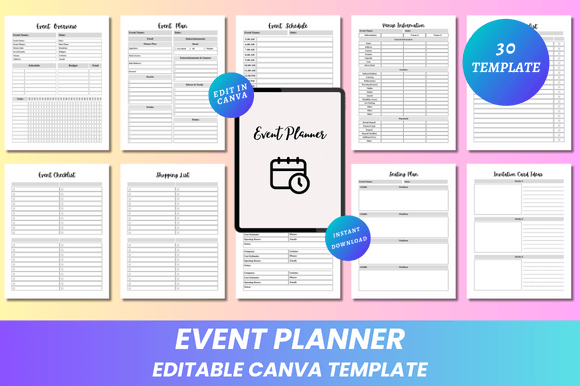
You’ll receive 30 pages of thoughtfully organized content—all sized at 8.5 x 11 inches, no bleed, optimized for home printing or professional print shops. Each file comes in multiple formats: editable Canva link, high-quality PDF (print-ready), JPG, and PNG. Whether you’re printing on glossy paper for a client presentation or sharing a clean PDF with your venue coordinator, you’re covered.
Solving Real Planning Challenges—Page by Page
Let’s talk about what actually gets missed in event planning—and how the Editable Event Planner Canva KDP Interior helps prevent those oversights:
- Overlapping deadlines? The Event Schedule and Pre-Event Checklist pages let you map out tasks by week or month—and color-code priorities so nothing slips through the cracks.
- Budget stress? The Event Budget, Expenses Tracker, and Payment Checklist work together to show real-time spending vs. allocations—no more last-minute spreadsheet scrambles.
- Vendor confusion? With dedicated sections for Event Contacts, Catering Companies, and Special Guest Demands, all key information lives in one place—and is easy to update as plans evolve.
- Guest management chaos? Track RSVPs, dietary restrictions, and plus-ones in the Guest List, then use the Seating Plan and Floor Plan pages to visualize arrangements before finalizing anything.
- Post-event follow-up fatigue? The Thank You Card and Gift Planner pages help you stay gracious and intentional—even after the event ends.
And because every template is fully editable, you’re not stuck with generic wording. Change “Ceremony Start Time” to “Sunset Vow Exchange,” rename “Vendor Contract Due” to “Florist Deposit Deadline,” or add your brand’s accent color across all pages in seconds.
Who Benefits Most—and How They Use It
The beauty of the Editable Event Planner Canva KDP lies in its adaptability across user types:
- DIY Planners love how quickly they can personalize everything—from font choices that match their wedding theme to custom headers for baby shower games.
- Small Business Owners (like photographers, florists, or wedding coordinators) use it as a client-facing tool—adding their logo, branding colors, and service packages directly into the planner before sending it off.
- Nonprofit Volunteers appreciate the Products List and Purchased Products pages to track donated items and receipts for transparency reports.
- Corporate Event Managers rely on the clean, minimal design and structured layout to align cross-functional teams—especially when sharing printed copies during pre-event walkthroughs.
No matter your role, the planner grows with you. Add notes in the Event Notes or My Notes pages. Swap out the default Invitation Card Ideas for your own mood board images. Even the Shopping List can become a shared grocery list for potluck-style events.
Practical Tips for Getting Started Fast
You don’t need to fill out all 30 pages at once. Start with three core sections: Event Overview, Event Budget, and Event Checklist. These form your foundational roadmap. Then, layer in supporting tools as your timeline progresses—like the Venue Information sheet two months out, or the Thank You Card section right after the event wraps.
Pro tip: Duplicate your Canva file before major edits—so you always have a clean master copy. And if you're printing at home, use the included PDFs (they’re optimized for crisp text and smooth gradients). For professional printing, the high-res JPG and PNG files ensure sharp results on premium paper.
Also worth noting: this is a lifetime resource. Once purchased, you keep full access—including future updates. There are no subscriptions, no expiring links, and no hidden fees.
More Than a Planner—It’s Peace of Mind
At its core, the Editable Event Planner Canva KDP delivers something deeper than organization: confidence. Knowing your floor plan aligns with your catering capacity. Seeing your budget balance in real time. Having a polished, branded invite idea ready to share with guests in under five minutes. These aren’t small wins—they’re the difference between feeling in control and feeling buried.
And because it’s designed with clarity and calm in mind—clean lines, ample white space, intuitive headings—you’re not adding visual noise to an already busy process. You’re streamlining it.
If you’ve ever stared at a blank document wondering where to begin, or spent hours tweaking a single table in Word only to realize it doesn’t print correctly—this planner was made for you. It’s practical. It’s personal. And it’s ready when you are.