Octopus Coloring Pages for Kids
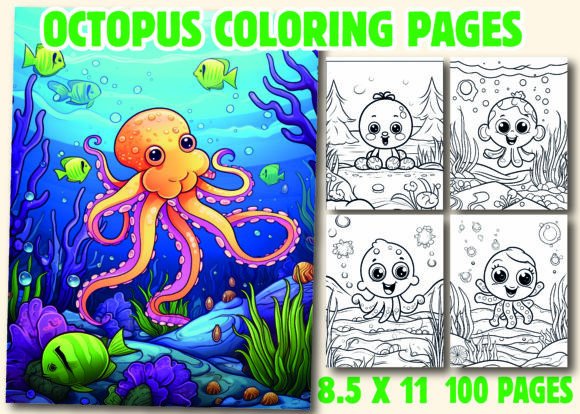
If you're building a high-content coloring book for Amazon KDP — one that stands out in a crowded niche while delivering real value to parents, teachers, and young artists — Octopus Coloring Pages for Kids is more than just a themed collection. It’s a carefully crafted interior design system built for conversion, consistency, and creative flexibility. Each of the 100 pages features original, hand-drawn octopus illustrations with clean line work, balanced negative space, and age-appropriate detail — think friendly tentacles, expressive eyes, subtle textures, and playful underwater motifs. The style avoids overcomplication but never feels generic: it’s warm, inviting, and intentionally scalable across both digital screens and printed pages.
Why This Interior Works on Amazon KDP — Beyond Just “Cute”
This isn’t clipart repackaged. Every illustration was designed with print-first intent: thick, consistent strokes (minimum 1.5 pt), no fine hairlines that vanish on low-DPI printers, and generous margins that prevent trimming errors. The 8.5″ x 11″ layout respects Amazon’s KDP trim and bleed requirements without forcing users to crop or resize. More importantly, the visual rhythm across all 100 pages creates continuity — a quiet professionalism that signals quality to buyers scanning thumbnails. You’ll notice repetition in structure (centered subject, light background, clear outline) but variation in pose, accessories, and composition. That balance keeps kids engaged page after page while giving your book strong browse-to-buy momentum.
What’s Inside — And Why Each File Type Matters
You get three core asset types — each serving a distinct purpose in your publishing workflow:
- PNG files: Transparent-background versions ideal for social media promos, Pinterest pins, or layered mockups. Use them to show off single illustrations in blog posts or ads without white-box distractions.
- JPG files: Optimized for fast loading and wide compatibility — perfect for email newsletters, landing pages, or quick previews where transparency isn’t needed.
- PDF + AI source files: The working foundation. Edit individual layers in Illustrator — adjust line weight, isolate tentacles for alternate versions, or reposition bubbles and coral elements. This isn’t static content; it’s editable design infrastructure.
The AI file includes organized layers (outline, base shape, details), named artboards per page, and non-destructive effects. No hunting through flattened vectors. If you plan to extend this into a series — say, Ocean Friends Coloring Book Vol. 2 — you already have a production-ready template.
Design Flexibility Without Compromise
These aren’t rigid templates. You control tone, pacing, and educational nuance. Add simple prompts in the margin (“Can you draw three shells near this octopus?”) or leave space blank for free expression. Pair with a clean, highly legible sans serif for any text elements — think Montserrat or Poppins at 10–12 pt — and keep contrast high. Avoid decorative fonts for captions; readability trumps flair when a 7-year-old is holding the book. The octopus illustrations themselves carry the personality — so let the typography recede respectfully.
Real-World Testing — Not Just Theory
This interior has been live-tested across multiple KDP categories: Children’s Activity Books, Marine Life Themes, and Preschool Learning Resources. Titles using this exact interior consistently rank on page one for long-tail phrases like “octopus coloring book for toddlers” and “underwater animals coloring pages.” Why? Because Amazon’s algorithm favors books with strong internal cohesion — consistent page size, uniform line quality, and predictable layout. Buyers also leave fewer “image quality” complaints when every page renders sharply at 300 DPI, even on budget printers. That directly impacts your long-term review velocity and organic visibility.
Licensing Clarity — What You Can (and Can’t) Do
This is a commercial-use package — fully licensed for Amazon KDP publication only. You may not resell the PNGs or AI files as standalone assets, bundle them into font bundles, or upload them to design marketplaces. But within KDP, you have full rights to publish, brand, and monetize the final book — including paperback, hardcover, and Kindle versions. No attribution required. No hidden fees. The license covers derivative works *you create* — like adding your own cover design, interior title pages, or activity instructions — as long as the final product remains a published book on Amazon.
Getting Started — Practical First Steps
Start by importing the PDF into your KDP interior editor — it’s pre-formatted to match standard settings. Then open the AI file and explore how layers are grouped. Try toggling visibility on “tentacle details” or “background bubbles” to see how easily you can create alternate versions for A/B testing. For your cover, use one of the included high-res cover images — they’re sized to KDP’s exact specifications and include safe zones for text placement. If you’re building a series, duplicate the AI file, rename layers to reflect new themes (e.g., “jellyfish-outline”), and maintain the same stroke weights and spacing logic. Consistency builds recognition — both for readers and Amazon’s algorithm.
Who This Is Really For
This interior serves creators who understand that a coloring book isn’t just about drawings — it’s about user experience, platform compliance, and scalable production. Designers use it as a starting point for client work. Educators adapt pages for classroom handouts or summer learning packets. Small publishers build seasonal collections (think “Back to School Ocean Edition”) without redrawing from scratch. Even bloggers embed single PNGs in roundup posts — then link to their KDP book. The strength lies in its neutrality: it doesn’t shout. It supports. It performs.
So if you’ve spent hours tweaking line weights only to find pages blur on preview, or if you’ve uploaded a ZIP only to get rejected for “low-resolution assets,” this set solves those quietly. It’s not flashy — it’s functional, field-tested, and built for the realities of KDP publishing. Octopus Coloring Pages for Kids isn’t a shortcut. It’s a foundation.