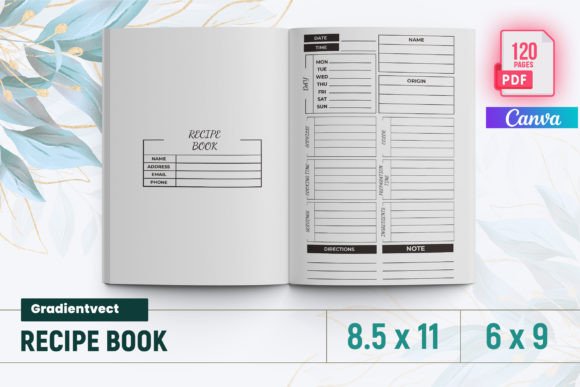
KDP Recipe Book Template Canva: A Professional Interior Solution for Self-Publishing Authors
Creating a polished, print-ready recipe book for Amazon Kindle Direct Publishing (KDP) demands more than just great recipes—it requires structural integrity, typographic clarity, and strict adherence to KDP’s technical specifications. The KDP Recipe Book Template Canva bridges that gap by offering a rigorously tested, production-ready interior design system built specifically for food-focused publications. Unlike generic Canva templates or DIY layouts cobbled together from free resources, this solution delivers precision-engineered formatting that meets Amazon’s exacting standards—without requiring advanced design software or publishing experience.
Why Technical Precision Matters in Recipe Book Interiors
Recipe books occupy a unique niche in self-publishing. Readers expect consistency across pages—uniform spacing between ingredients and instructions, clear visual hierarchy for titles and subheadings, consistent font sizing for measurements versus narrative text, and reliable pagination for cross-referencing. Even minor deviations—such as inconsistent bleed margins, unoptimized image resolution, or incorrect page dimensions—can trigger KDP’s automated quality checks, leading to upload rejections or printed output with unintended white borders or cropped content.
This is where the KDP Recipe Book Template Canva distinguishes itself. Every element—from baseline grid alignment to margin allowances—is calibrated for 8.5 × 11 inch interiors (the most widely adopted size for U.S.-based print-on-demand), with full bleed support enabled. That means images and background elements extend precisely 0.125 inches beyond the trim edge, eliminating the risk of accidental white borders after cutting. The template has been validated using KDP’s online previewer and physical proof copies, ensuring compatibility across both standard and premium color printing options.
What’s Included—and Why Each Component Serves a Purpose
The package includes seven key deliverables, each fulfilling a specific functional need in the publishing workflow:
- READY TO UPLOAD PDF FILE: A single, flattened, CMYK-optimized PDF that complies with KDP’s file requirements—including embedded fonts, correct color profiles, and proper bleed settings. No post-download editing or export adjustments are needed before submission.
- 6–9 8.5 × 11 inch pages: A flexible layout range allows authors to scale content volume without compromising structure. Whether launching a concise seasonal collection or an expansive culinary compendium, the template maintains readability and aesthetic cohesion across varying lengths.
- 120 total pages: Designed with scalability in mind, the interior accommodates up to 120 pages while preserving navigational logic. This supports multi-section organization—appetizers, mains, desserts, beverages, substitutions, storage tips—without disrupting flow.
- Intro page: Pre-formatted with space for author bio, dedication, acknowledgments, or usage notes. Its typography subtly signals tone—approachable yet authoritative—setting reader expectations before the first recipe appears.
- Files tested on Amazon KDP: Not merely “designed for” but empirically verified. Each file underwent multiple upload cycles, including soft-proof generation and hard-copy validation, confirming zero warnings related to resolution, bleed, or font embedding.
- PNG Files: High-resolution, transparent-background assets for customizing section dividers, decorative flourishes, or ingredient icons. These retain clarity when scaled and integrate cleanly into Canva’s editor without pixelation.
- JPG Files: Optimized for photographic content—ideal for recipe step-by-step visuals or finished-dish hero shots. All JPGs are saved at 300 DPI and sRGB color space, matching KDP’s recommended image specifications.
Real-World Implementation Across User Profiles
Different creators interact with the KDP Recipe Book Template Canva in distinct ways—each leveraging its structure to solve context-specific challenges.
Culinary educators use the consistent header/footer system to insert course identifiers, learning objectives, or QR codes linking to video demonstrations. The uniform spacing between bullet points in ingredient lists ensures students can quickly scan quantities and prep steps during lab sessions.
Hobbyist bakers documenting family traditions benefit from the flexible intro page and optional blank journaling spreads—allowing handwritten notes, vintage photo scans, or handwritten annotations alongside typed content. Because the template supports both digital and print workflows, they can produce personalized gifts and also list professionally on Amazon.
Meal-prep coaches and nutrition consultants rely on the built-in table of contents framework to group recipes by dietary category (keto, gluten-free, high-protein), meal type (breakfast bowls, freezer-friendly dinners), or time-to-prepare thresholds. The standardized page count per section simplifies client handout creation and ensures proportional visual weight across topics.
Small food businesses integrate branded PNG elements—logos, signature colors, taglines—into headers or section breaks. Since all graphic assets are provided separately, they maintain brand continuity without violating KDP’s content guidelines around promotional material.
Workflow Integration Beyond Canva
Although named for its Canva compatibility, the KDP Recipe Book Template Canva functions effectively within broader creative ecosystems. Users commonly begin drafting recipes in Google Docs or Notion, then copy-paste finalized text into Canva’s editable fields. Because the template uses system-safe fonts (e.g., Lato, Merriweather, Open Sans) with fallback options, formatting remains stable across devices and operating systems.
For those incorporating original photography, the JPG assets serve dual roles: as placeholders during layout and as optimized final images. Photographers familiar with Lightroom or Capture One can batch-export edited shots directly into the template’s designated image frames—no resizing or resampling required. Designers using Adobe InDesign occasionally import the PDF as a layered reference to align custom illustrations or infographics, appreciating the underlying grid structure for precise placement.
Importantly, no proprietary plugins or subscription dependencies are involved. The template works natively within Canva’s free tier, though Pro features (like Brand Kit integration or background remover) accelerate customization for teams managing multiple cookbooks or seasonal editions.
Design Philosophy Embedded in the Layout
The interior reflects evidence-based readability principles. Line height is set to 1.45 for body text—wide enough to prevent crowding but tight enough to avoid excessive vertical scrolling in digital previews. Ingredient lists use hanging indents, allowing measurement units (¼ tsp, 2 cups) to align visually, reducing cognitive load during active cooking. Step-by-step instructions follow a numbered, left-aligned progression with sufficient line spacing to distinguish actions clearly—even when viewed on smaller tablet screens.
Typography hierarchy is intentional: H1 recipe titles appear in bold, slightly oversized serif type; H2 subheadings (e.g., “Make-Ahead Tips”) use medium-weight sans-serif for contrast; body copy remains neutral and highly legible. There are no decorative fonts used for critical information—ensuring accessibility for readers using screen readers or dyslexia-friendly display modes.
Margin conventions also follow best practices. Inner gutters remain generous (0.75 inches) to prevent text loss near the binding, while outer margins accommodate thumb space during handheld use. Page numbers sit discreetly in the footer, outside the live area, avoiding interference with recipe content.
Strategic Considerations Before Downloading
While the KDP Recipe Book Template Canva solves many technical hurdles, successful deployment depends on thoughtful preparation. Authors should finalize their manuscript—including all images, captions, and cross-references—before beginning layout. Inserting placeholder text and swapping it later often disrupts spacing logic, especially in multi-column or image-heavy sections.
It’s equally important to understand KDP’s content policies. While the template enables professional presentation, it does not override Amazon’s editorial guidelines. Recipes must be original or properly attributed; derivative works based on copyrighted cookbooks require explicit permission. Likewise, health claims (“cures diabetes,” “reverses aging”) fall outside allowable content—even if stylistically consistent with the template’s clean aesthetic.
Finally, consider version control. Because the template includes editable layers, saving incremental backups (e.g., “_v2_final_edit,” “_v3_proof_approved”) prevents accidental overwrites during collaborative review cycles. Many teams assign one person final export authority to ensure only the approved PDF reaches KDP.
Long-Term Utility and Iterative Use
Unlike one-off designs, this template supports iterative publishing. An author who releases a holiday-themed edition one year can duplicate the structure, update imagery and seasonal ingredients, and publish a new ISBN the following year—retaining core design equity while refreshing content. Educators building semester-long curricula reuse the same navigation logic across multiple student workbooks, reinforcing familiarity and reducing onboarding time.
Over time, users often develop personal adaptations: adding a “Chef’s Note” sidebar style, inserting metric/imperial conversion tables, or integrating QR-linked shopping lists. Because the base files include layered PNGs and editable text blocks—not flattened graphics—the template evolves organically with the creator’s practice.
In essence, the KDP Recipe Book Template Canva isn’t just a shortcut to publication. It’s a scaffold for intentionality—supporting clarity, consistency, and credibility across every page turned, whether by a home cook timing pasta or a dietitian recommending balanced meals. When technical reliability meets thoughtful design, the result isn’t just a book that prints well—it’s one that earns trust, invites return visits, and sustains relevance long after the first upload.