Missed Call Log Canva KDP
Keeping track of missed calls used to mean scribbling notes on sticky pads or scrolling endlessly through phone logs—often missing context, timing, or follow-up details. A Missed Call Log Canva KDP changes that. It’s a professionally designed, editable interior template built specifically for Amazon Kindle Direct Publishing (KDP), optimized for print-on-demand planners and logbooks. Think of it as your organized, ready-to-publish solution for recording, categorizing, and acting on missed calls—whether you’re managing client outreach, field service coordination, customer support, or even personal communication habits.
Why This Template Solves Real Problems
Missed calls aren’t just about numbers—they represent opportunities, urgency, accountability, and sometimes, risk. A small business owner might miss a call from a potential vendor during a busy launch week. A healthcare coordinator could overlook a callback request from a patient needing urgent scheduling. A freelancer may forget to follow up after a promising interview. Without structure, these moments slip away. The Missed Call Log Canva KDP helps turn those gaps into actionable records: date, time, caller name or number, reason for the call, status (e.g., “returned,” “pending,” “not required”), and space for notes. It’s not just logging—it’s intentional communication management.
What You Get—and Why It Matters
This isn’t a generic PDF you’ll need to reformat or debug. Everything is pre-tested and built to Amazon KDP’s strict specifications:
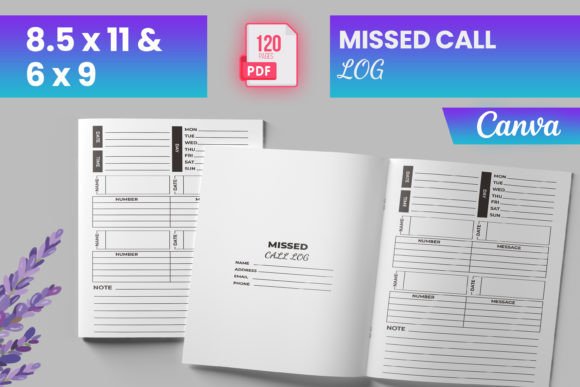
- READY TO UPLOAD PDF FILE — No extra software or conversion needed. Just download, review, and upload directly to KDP.
- Multiple standard sizes — Includes 6″ × 9″, 8.5″ × 11″, and other common trim sizes so you can choose what fits your audience best.
- 120 total pages — Enough space for consistent use over several months, with room to add custom sections or reflections.
- Intro page included — A clean, branded title page that sets the tone and adds professionalism before the first log entry.
- Tested on Amazon KDP — Files were validated for bleed, margins, resolution, and compatibility—no surprises at proof stage.
- PNG and JPG source files — For creators who want to tweak colors, fonts, or layout in Canva before final export.
- Bleed-ready interior — Designed with proper bleed (0.125″) and safe zones so content doesn’t get cut off during printing.
That last point is critical: many free templates fail at print quality because they ignore bleed or margin rules. This one doesn’t. It’s built by someone who knows how KDP actually works—not just how design tools look on screen.
Who Benefits Most—and How
You don’t need to be a publisher or designer to find value here. Here’s how different users apply it:
- Small business owners use it as part of a printed operations toolkit—paired with appointment logs or lead trackers—to ensure no inquiry goes unanswered.
- Freelancers and solopreneurs keep it beside their desk or tablet stand, logging inbound calls during client hours and reviewing them each afternoon for timely follow-ups.
- Educators and trainers adapt it for classroom communication logs—tracking parent calls, admin requests, or tech support issues without mixing them into personal devices.
- Remote workers and hybrid teams integrate it into their analog-digital workflow: jot down missed calls offline, then sync key actions to digital calendars or CRM tools later.
- Canva-savvy creators treat it as a foundation—swapping icons, adjusting headers, or adding QR codes that link to voicemail transcripts or contact forms.
It’s especially helpful if you prefer physical logs over apps—maybe due to screen fatigue, privacy concerns, or simply liking the tactile rhythm of writing things down. And because it’s editable in Canva, you’re never locked into one version. Change fonts, adjust spacing, insert your logo, or translate headers—all without touching code or complex desktop publishing software.
Practical Tips Before You Use It
Before uploading to KDP or sharing with others, consider these realistic checks:
- Review your target audience’s needs — Do they prefer minimal layouts? More visual cues? Less text-heavy pages? The template gives flexibility, but clarity starts with knowing who’ll hold the book.
- Double-check bleed and margins — Even though this file is tested, always preview your final PDF using KDP’s online previewer. Look closely at corners and edges.
- Test print a single page — If possible, run one page through your home or local printer. That reveals subtle contrast, font legibility, and spacing issues no screen can fully show.
- Think beyond logging — Could you add a weekly reflection prompt? A “Top 3 Calls to Return” section? The editable format invites thoughtful customization—not just filling blanks.
- Pair it wisely — This interior works best when matched with a strong cover (also available separately or designed in Canva). Consistency in tone and branding builds trust faster.
A Thoughtful Tool, Not Just Another Template
At its core, the Missed Call Log Canva KDP reflects a shift: from reactive scrambling to calm, consistent tracking. It’s not flashy—but it’s reliable. Not complicated—but it’s precise. And unlike many digital tools that require subscriptions or learning curves, this lives quietly on your shelf, opens instantly, and asks only that you show up with intention.
Whether you're launching your first KDP planner, building a niche productivity brand, or simply tired of losing track of important conversations, this interior gives you a clean, professional, and stress-free starting point. No coding. No guesswork. Just clear space, smart structure, and the freedom to make it your own.