KDP Social Media Post Planner Canva
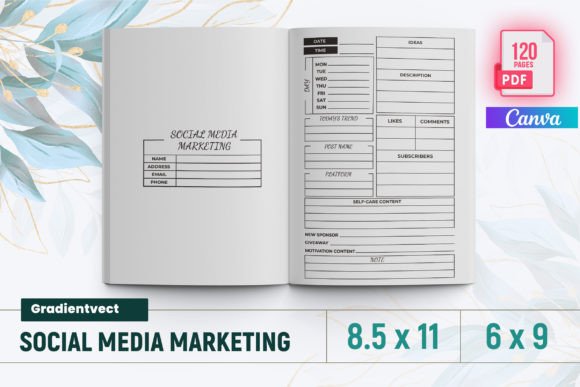
If you’re juggling content calendars, platform-specific goals, analytics tracking, and brand consistency across Instagram, Pinterest, LinkedIn, YouTube, email, and blogs—then the KDP Social Media Post Planner Canva isn’t just another printable. It’s a working system built for creators who treat planning like strategy, not checklist.
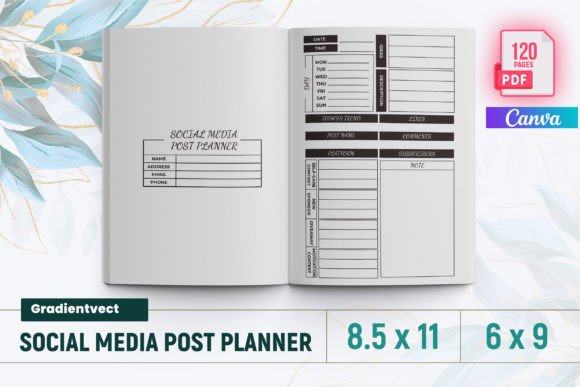
This isn’t a generic planner with placeholder pages. Every one of its 120 interior pages was designed with real-world publishing constraints in mind—tested on Amazon KDP to meet bleed, margin, resolution, and file-type requirements. You get a ready-to-upload PDF (8.5 × 11 inches), plus PNG and JPG source files—so whether you’re tweaking a Pinterest Boards Planner or adjusting your Brand Board before final export, flexibility stays intact.
A Planner That Thinks Like You Do
The KDP Social Media Post Planner Canva carries a clean, confident visual personality: structured but not rigid, detailed but not overwhelming. Its layout language leans into modern editorial design—think tight grids, purposeful white space, consistent iconography, and intentional hierarchy. There’s no decorative clutter. Instead, you’ll find smartly labeled sections like Post Planner, Campaign Manager, Subscriber Milestones, and Monthly Assessment—each serving a distinct operational need, not just aesthetic symmetry.
That clarity extends to how it supports decision-making. Pages like Let’s Reflect and Vision Board invite intentionality—not passive filling-in. The Smart Goals and Goal Review spreads encourage measurable thinking. Even the Daily Checklist avoids vague prompts; it’s calibrated for actual workflow rhythm, not aspirational busywork.
Designed for Real Publishing Workflows
Because this is built for Kindle Direct Publishing, every page includes proper bleed (0.125" on all sides) and safe margins—no cropping surprises when your interior goes live. The typography is optimized for legibility at print scale: clear sans serif headings, generous line spacing in trackers, and well-weighted body text that holds up even when photocopied or printed on standard office paper.
You’ll notice thoughtful details: the Instagram Planner includes dedicated slots for caption drafts, hashtag sets, and link-in-bio notes—not just image placeholders. The Email Series Planner maps subject lines, send dates, and open-rate benchmarks side-by-side. And the Pinterest Analytics and LinkedIn Analytics pages use simple tables—not dense charts—so you can log metrics fast and spot trends without spreadsheet fatigue.
It’s also built to scale with your growth. Sections like Follower Tracker and Blog Stats aren’t static—they’re formatted to accommodate quarterly reviews or year-over-year comparisons. Even the Brand Fundamentals spread gives space for voice guidelines, color hex codes, and tone examples—not just logo placement.
More Than Pages—It’s a Design Asset
The KDP Social Media Post Planner Canva works as both a functional tool and a design reference. Its consistent grid structure, balanced typographic scale, and restrained color-ready palette make it ideal for designers building client-facing social media kits—or entrepreneurs refining their own brand identity. Use it as a starting point for custom Canva templates, adapt layouts for Notion dashboards, or extract elements (like the Brainstorming or To Do List frameworks) into slide decks or team briefs.
For marketers, the Posting Schedule and Newsletter Results pages reinforce cadence discipline—especially when paired with the Weekly Goals and Monthly Assessment spreads. For bloggers and podcasters, the YouTube Profile and Subscriber Milestones pages help align content output with audience growth metrics—not vanity numbers.
What You Actually Get—No Guesswork
- One ready-to-upload PDF file—formatted to Amazon KDP specs, bleed included, tested and verified.
- 120 total interior pages, each purpose-built—not filler or repetition.
- Intro page that sets tone and usage context—not just a title.
- PNG and JPG source files for easy editing in Canva, Photoshop, or Affinity apps.
- No hidden layers or locked assets—everything is editable, scalable, and production-ready.
There’s no “bonus” section padded with low-value pages. Every spread serves a documented need: from Twitter and LinkedIn Post planners to Newsletter Planner and Post Planner (yes—two distinct versions, each optimized for different planning rhythms). Even the dual Vision Board pages reflect different uses—one for long-term aspiration, one for near-term alignment.
Who Benefits Most—and Why
This planner shines for creators who’ve outgrown free templates but don’t want to build from scratch. Designers use it to onboard clients faster—embedding brand guidelines directly into the planning flow. Small business owners rely on the Campaign Manager and Analytics pages to connect content effort to conversion. Bloggers appreciate how the Content Calendar integrates with Email Results and Blog Stats—so traffic spikes can be traced back to specific posts or newsletter hooks.
Hobbyists and crafters find value in the Brand Board and Pinterest Boards Planner—tools that help turn passion projects into recognizable, repeatable experiences. And for publishers launching multiple KDP titles, the Social Media Goal Tracker and Let’s Reflect pages support iterative learning across launches—not just one-off campaigns.
If you’ve ever spent more time formatting a planner than using it—or uploaded a KDP interior only to discover margins were off or bleed wasn’t applied—the KDP Social Media Post Planner Canva solves that. It’s not about perfection. It’s about removing friction so your energy stays where it belongs: creating, analyzing, and growing.