KDP Wedding Planner Canva
Planning a wedding is equal parts joy and logistics—and for creators, designers, and self-publishers, it’s also a meaningful opportunity to build value. The KDP Wedding Planner Canva isn’t just another printable—it’s a professionally structured, production-ready interior designed specifically for Amazon Kindle Direct Publishing. It bridges intention and execution: thoughtfully organized pages meet KDP technical precision, so your planner launches with confidence, not corrections.
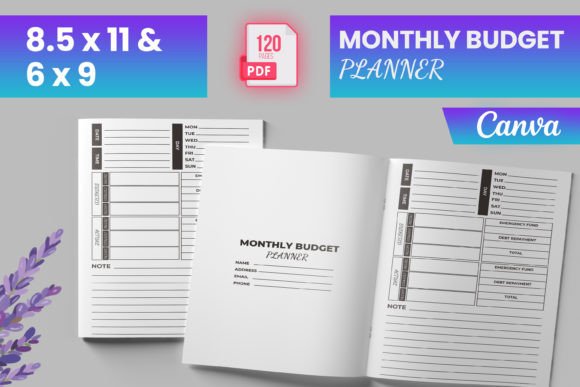
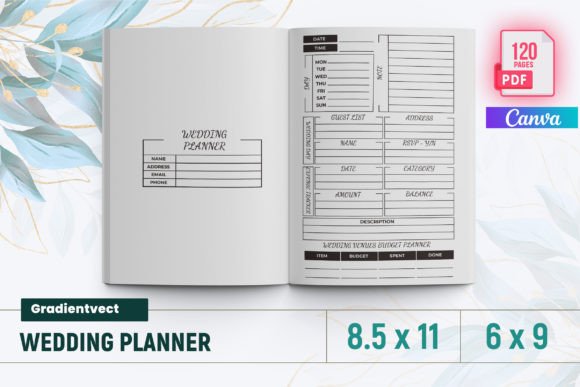
This template delivers 120 fully laid-out pages—tested on KDP to ensure bleed alignment, margin integrity, and print fidelity across both 6x9 and 8.5x11 trim sizes. No guesswork. No last-minute formatting scrambles. Just a clean, consistent interior that meets Amazon’s specifications out of the gate—including bleed-ready files, high-resolution PNGs and JPGs, and a ready-to-upload PDF.
What Makes This Interior Stand Out for Planners and Publishers?
Unlike generic wedding planners, this interior was built with real workflow logic—not just aesthetics. Each section supports a distinct phase of planning, from early visioning to post-wedding reflection. You’ll find:
- WEDDING DAY Budget Planner — Line-item tracking with category totals and visual progress cues
- Guest List & WEDDING DAY Guest List — Two-tiered organization: master list + day-of seating-ready version
- VENUES Comparison — Side-by-side scoring grids for capacity, cost, accessibility, and vibe
- PREPARATION Sketch & Timeline Planner — Visual timeline blocks plus blank sketch space for ceremony flow or floor plans
- Wedding Party Contact Lists — Separate, labeled sections for bridesmaids, groomsmen, flower girls, and ring bearers—each with dedicated notes fields
- AFTER THE Wedding — Gratitude tracker, thank-you note status, vendor review prompts, and keepsake storage ideas
It’s not about filling pages—it’s about reducing cognitive load. When couples open this planner, they’re guided—not overwhelmed. That clarity is what builds trust, encourages consistent use, and turns a one-time purchase into an ongoing resource.
Creative Adaptations for Different Creators
The strength of the KDP Wedding Planner Canva lies in its adaptability. Here’s how different users bring it to life:
Designers & Canva Users: Swap color palettes, fonts, and icons using Canva’s drag-and-drop interface. Replace stock illustrations with custom line art or watercolor elements to reflect a specific aesthetic—rustic, modern minimalist, vintage botanical, or bold editorial. Because all layers are editable and labeled, rebranding takes minutes—not days.
Self-Publishers & Small Business Owners: Bundle this interior with a companion cover (designed in Canva or Illustrator) and launch as a low-cost, high-value digital+print offering. Add a short “How to Use This Planner” guide as a bonus PDF—simple but strategic. You’re not just selling pages; you’re selling peace of mind.
Educators & Wedding Coaches: Use individual pages as handouts in workshops—print the Monthly Planner for goal-setting exercises, or project the Timeline Planner during group strategy sessions. Export single pages as JPGs for slides or social posts. The structure supports teaching, not just personal use.
Bloggers & Content Creators: Feature the 30 Day Self-Care Challenge or Glowing Skin Challenge in seasonal content—linking directly to your KDP listing. These aren’t filler pages; they extend relevance beyond the wedding day and speak to holistic preparation. Readers who engage with those sections often convert because they see your attention to real-life needs.
Practical Tips for Launching With Confidence
If you're preparing to upload to KDP, here’s what matters most:
- Verify bleed and margins. This interior includes 0.125" bleed on all sides and safe zones for text—critical for avoiding cut-off headers or clipped checkboxes. Always preview using KDP’s online previewer before approving.
- Use the included PNG/JPG files for marketing. Showcase real page spreads—not mockups—in your Amazon description and social posts. Authenticity builds credibility faster than stylized renders.
- Group related sections when promoting. Instead of listing 20+ page titles, cluster them: “Budget & Vendor Tools,” “People & Contact Systems,” “Timeline & Daily Prep.” That matches how buyers think—and search.
- Keep your branding consistent—but not rigid. If you plan to publish multiple planners (elopement, destination, LGBTQ+ inclusive), maintain shared design language—same header style, icon set, or spacing rhythm—while adapting tone and imagery to each audience.
Why Structure Matters More Than Sparkle
Yes, beautiful design attracts attention. But usability retains it. A planner with stunning covers and inconsistent spacing, misaligned checkboxes, or unclear hierarchy will frustrate users—even if it looks great on a thumbnail. The KDP Wedding Planner Canva prioritizes functional consistency: every checklist uses the same bullet style; every date field aligns vertically; every expense column calculates cleanly in printed form.
That consistency isn’t accidental—it’s engineered. Page numbering follows KDP’s “Belongs To” logic, meaning intro pages are unnumbered, and content begins cleanly on page 1. Section dividers use subtle typography shifts—not distracting graphics—so navigation feels intuitive, not decorative.
And because it includes My Morning-to-Evening Skin Care Routine and the 30 Day Self-Care Challenge, it acknowledges that wedding prep is deeply personal. It doesn’t assume all users want the same experience—just that they deserve tools flexible enough to support theirs.
Realistic Next Steps for Your Project
You don’t need to reinvent the wheel to stand out. Start small:
- Customize one section—like the Gift Ideas WEDDING PARTY page—with culturally specific suggestions or niche themes (e.g., “For the Book-Lover Couple” or “Eco-Conscious Tokens”).
- Add a two-page “Vendor Contract Checklist” as a free download on your website—driving email signups while demonstrating your depth of insight.
- Translate key headers into Spanish or French and test a bilingual version—especially effective for destination wedding markets.
- Pair the planner with a short audio guide (“5-Minute Weekly Planning Rituals”) sold separately or as a bundle.
Every adaptation should answer a quiet question your audience asks: “Does this understand my reality?” The KDP Wedding Planner Canva gives you the foundation to say yes—clearly, confidently, and consistently.